Keep the engineer in flow엔지니어의 흐름을 끊지 않기
Logs, signals, graphs, scripts, Log Stream, and AI live close together, so the next question is never several tools away. 로그, 시그널, 그래프, 스크립트, Log Stream, AI를 한 작업공간 안에 모아 다음 확인이 멀리 떨어져 있지 않게 만들었습니다.
Real CAN work rarely happens in one neat step. You open a log, match a DBC, chase a signal, compare graphs, reproduce frames, automate the boring checks, and explain what changed. AiCAN began with one simple idea: keep that entire rhythm in one place. 현장에서 CAN 데이터를 볼 때는 한 가지 일만 하지 않습니다. 로그를 열고, DBC를 맞추고, 시그널을 찾고, 그래프를 비교하고, 프레임을 다시 보내고, 반복 검사를 자동화하고, 결국 “무엇이 달라졌는지” 설명해야 하죠. AiCAN은 그 흐름이 끊기지 않았으면 좋겠다는 생각에서 시작했습니다.
Logs, signals, graphs, scripts, Log Stream, and AI live close together, so the next question is never several tools away. 로그, 시그널, 그래프, 스크립트, Log Stream, AI를 한 작업공간 안에 모아 다음 확인이 멀리 떨어져 있지 않게 만들었습니다.
New users should start quickly, experienced users should dig deep, and the interface should stay calm while the data gets complicated. 처음 쓰는 사람은 빠르게 시작하고, 숙련자는 깊게 파고들 수 있어야 합니다. 데이터가 복잡해질수록 화면은 더 차분해야 한다고 믿습니다.
Advanced CAN analysis should not be reserved only for large organizations. Startups, labs, and small companies deserve a practical path too. 제대로 된 CAN 분석 환경이 큰 조직만의 선택지가 되어서는 안 됩니다. 스타트업, 연구실, 작은 회사도 부담 없이 시작할 수 있어야 합니다.
Powerful engineering toolset designed for efficiency and flexibility
AiCAN is currently available for Windows. macOS is coming soon, and Linux is in preparation.
Perform diagnostics and log analysis with local models or user-configured external AI APIs. External mode sends the selected prompt and analysis context directly to that provider; raw frame bytes can be redacted.
Design custom panels by dragging widgets (gauges, buttons, lights). Bind interactive logic using flowchart-based visual diagrams and export them as independent programs (.aicapp).
Quickly search and verify loaded DBC messages and signals. Edit parameters, scales, and endianness in-memory, then validate and export directly back to physical .dbc files.
Write automation scenarios with direct events like 'on message', 'on signal', and 'on timer'. Powerful, lightweight scripting engine built specifically for automated diagnostic testing.
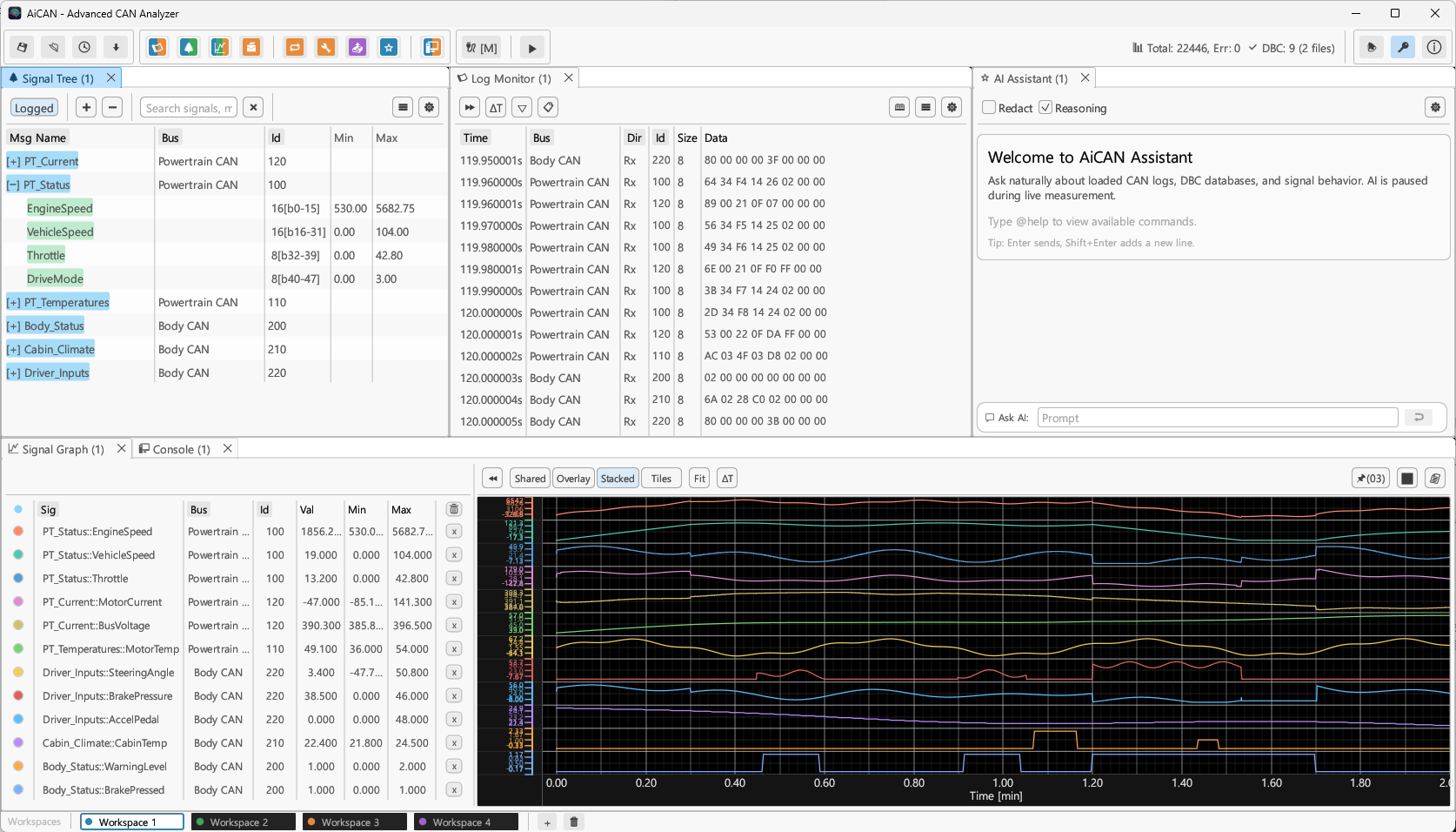
Calculate delta-times alongside high-performance signal plotting. Supports three graph rendering modes (Shared, Overlay, Stacked) to analyze bus loads and instantly visualize frame drops.
Organize your work with a flexible tab-docking layout and split panels
Choose between lightweight scripting DSL or visual block builder
AiCAN features a custom, event-driven domain-specific language (DSL) for quick test automation without setting up complex runtimes.
on message 0xID : Trigger on CAN frame receptionon signal Msg.Sig : Trigger on DBC signal updateson timer <ms> : Trigger periodic execution tasks// 100ms periodic timer event
on timer 100 {
let speed = get_signal("EngineState", "EngineSpeed");
if speed > 3000.0 {
log("warning: Over-speed detected!");
set_signal("Dashboard", "WarningLed", 1);
}
}
// Receive message 0x201 event
on message 0x201 {
// Send a response CAN message
send_message("ResponseMsg", [0x01, 0xFF, 0x00, 0x00]);
}Build full-fledged test panels by dragging widgets onto the canvas and linking inputs/outputs with logical connectors.
App Layout : Drag gauges, buttons, and status lights to design custom GUI panelsLogic Flow : Draw flowchart connections to visually define interactive logicStandalone App : Compile and export as an independent executable program (.aicapp)Choose a plan for CAN analysis, automation, AI-assisted workflows, and standalone app creation. CAN 분석, 자동화, AI 보조 업무, 독립 실행 앱 제작에 맞는 플랜을 선택하세요.
Connect hardware, capture CAN traffic, and inspect raw logs without a paid license. 유료 라이선스 없이 하드웨어를 연결하고 CAN 트래픽을 기록해 Raw 로그를 확인할 수 있습니다.
A practical entry plan for individual engineers who need real CAN analysis workflows. 실제 CAN 분석 업무를 시작하는 개인 엔지니어를 위한 기본 플랜입니다.
The standard plan for ECU development, test engineering, and repeated diagnostic work. ECU 개발, 시험 엔지니어링, 반복 진단 업무를 위한 표준 플랜입니다.
For teams that need automation, custom panels, and standalone app builder workflows. 자동화, 커스텀 패널, 독립 실행 앱 빌더가 필요한 팀을 위한 플랜입니다.
A contract plan for organizations that need perpetual licensing, maintenance, seats, and deployment support. 영구 라이선스, 유지보수, 좌석 수, 배포 지원이 필요한 조직을 위한 계약 플랜입니다.
Our online order process is conducted by our reseller Paddle.com. Paddle.com is the Merchant of Record and handles payment processing, taxes, receipts, billing support, cancellations, and returns. CYG provides AiCAN product, technical, and licence support. 온라인 주문은 리셀러인 Paddle.com을 통해 진행됩니다. Paddle.com은 Merchant of Record로서 결제 처리, 세금, 영수증, 결제 문의, 구독 취소 및 환불을 담당하고, CYG는 AiCAN 제품·기술·라이선스 지원을 담당합니다.
The final payment amount and applicable taxes are shown on the Paddle checkout page before payment is completed. 최종 결제 금액과 세금은 Paddle 결제 화면에서 확인됩니다.
Subscriptions can be canceled through the Paddle buyer portal before the next renewal. Refund and billing requests are handled by Paddle; CYG assists with product defects and licence activation. 구독은 다음 갱신 전에 Paddle 구매자 포털에서 취소할 수 있습니다. 환불 및 결제 문의는 Paddle에서 처리하며, CYG는 제품 문제와 라이선스 활성화를 지원합니다.
Refund policy환불 정책After successful payment, an AiCAN license key is generated automatically and sent to the purchase email. Enter the key in the desktop app to activate paid features on the licensed device. 결제가 완료되면 AiCAN 라이선스 키가 자동 생성되어 구매 이메일로 발송됩니다. 데스크톱 앱에 키를 입력하면 해당 장치에서 유료 기능이 활성화됩니다.